Agentic harness
On this page
This page is generated from docs/source/concepts-agentic-harness/ — each section below links to its own source.
The agentic harness is the interaction model that folio-assistant runs on — the rules, states, and workflows that govern how an agent and a user collaborate inside this platform. Much of this behaviour is already described across individual skills and guidance documents; this page consolidates it into one reference so that an agent entering a session can look up the expected behaviour rather than reconstructing it from scattered rules.
This is not about the agent’s internal architecture. It is about the observable contract between the agent and the user: what states the interaction can be in, how requests are classified, which workflow the agent enters for each class, and what the user should expect at each stage.
Interaction states
A user–agent interaction is always in exactly one of two states:
Idle state
The agent has no active workflow. It is waiting for a user request. On receiving one, it classifies the request (see Request classification) and transitions into the appropriate workflow state.
Workflow state
The agent is executing a named workflow — each represented by a BPMN process diagram with the agent and user in separate swim lanes. The active workflow determines what the agent does next and what it expects from the user.
Active workflows in this platform:
| Workflow | BPMN source | Entered when |
|---|---|---|
| Authoring (paper) | authoring-a-paper.bpmn | User requests content authoring in a paper folio |
| Authoring (document) | authoring-a-document.bpmn | User requests content authoring in a document folio |
| Content lifecycle | content-lifecycle.bpmn | Content moves through validate → render → publish |
| Document ingestion | document-ingestion.bpmn | User drops a file in uploads/ |
| Draft to publication | draft-to-publication.bpmn | Content moves from draft to published |
| CRDM requirements | crdm-requirements.bpmn | Agent detects a feature request |
| Evidence retrieval | evidence-retrieval.bpmn | Agent searches for evidence to support a claim |
State transitions: a workflow can be suspended when the user asks to switch context. The agent records where it was (the current BPMN activity) and can resume later. Only one workflow is active at a time, but suspended workflows form a stack — the most recent is resumed first.
The key rule: the agent always knows which workflow it is in. If it does not, it is in the idle state, and the next request starts a new workflow.
Session lifecycle
Every agent session follows the same lifecycle:
Start — run the session-start sweep (
beans prime,beans list,scripts/session-start-coord-sweep.sh). This surfaces the current work-plan, how far the default branch has moved, and recent sibling branch activity. SeeAGENTS.md § At session start.Classify — each user request is classified (see next section) and routed to the appropriate workflow.
Execute — the agent works within the active workflow, following its BPMN process. Each turn reports the bean being worked on and what is next.
Commit — every meaningful unit of work gets its own commit and push. PRs are opened at the first commit, not the end. See
AGENTS.md § Commit early, commit often, always PR.Handoff — when the session ends (user leaves, context limit, token exhaustion), the agent’s durable state is:
- Committed and pushed code
- Beans updated with status and notes
- Issue comments with summaries of what was accomplished
- The chat is ephemeral; everything else survives
Request classification
Every user request is classified into one of these categories. The classification determines which workflow the agent enters.
| Category | Description | Workflow entered |
|---|---|---|
| Content authoring | Write, edit, extend folio content (chapters, blocks, sections) | Authoring workflow (paper or document) |
| Content review | Review, validate, provide feedback on existing content | Content lifecycle / editing-HCI workflow |
| Content ingestion | Ingest a source document into the folio | Document ingestion workflow |
| Feature request | Request new platform capability (see crdm-detect) | CRDM requirements workflow |
| Information request | Ask about the platform, content, or process | No workflow — answer directly |
| Tool invocation | Run a specific tool (content_validate, qa_sweep, etc.) | No workflow — execute and report |
| Work-plan management | Create, update, or query beans | No workflow — execute and report |
| Bug report | Report broken behaviour in existing features | Triage: fix directly if small, CRDM if redesign needed |
The feature-request detection rule
The critical classification boundary is between content authoring and
feature request. The crdm-detect skill
(skills/sdlc/crdm/crdm-detect.md)
provides the detailed detection signals. The summary rule:
If implementing the request would require changes to folio-assistant (the platform repository) rather than to a folio repository, the request is a feature, and the agent should enter the CRDM workflow.
When uncertain, the agent asks: “This sounds like it might need a platform change — is that right, or is this something I can do within the current content model?”
Content workflows
When a request is classified as content work (authoring, review, ingestion), the agent follows the corresponding BPMN workflow. The existing documentation pages describe these in detail:
Publication workflow — the content lifecycle from draft through validation, rendering, and publication. Covers roles (author, reviewer, editor), the base processes, activities and skills.
Document ingestion — how a dropped file becomes an L1 source: extract structure, derive content, build the L1 knowledge graph, completeness gate.
Writing guides:
The harness does not redefine these workflows. It provides the entry point — classifying the request and routing to the right one — and the exit point — returning to idle state when the workflow completes, or suspending if the user switches context.
Deterministic and agentic processing
Workflow processing here is a spectrum, not a switch, and the harness is
already at four different points on it without ever having named the axis:
cat-harness.processes:policy enforcement decides whether a step that is not enabled is
refused or merely noted; relaxable="false" decides whether a package may
negotiate a base step away; cat-harness.processes:decision decides whether a branch is
computed from a table rather than chosen; and the commit-boundary gate refuses
the write by something that is not the agent.
Those are not one axis, and treating them as one is the first thing to get wrong. At least three questions are being conflated — who decides the branch, what happens if the decision is wrong, and who enforces. A step can be fully agentic on the first and fully deterministic on the third: the commit boundary is exactly that, an agent deciding freely and a hook refusing the write regardless.
A gateway now says which it is. <cat-harness.processes:decision> means a table computes it
and a hand-supplied outcome is refused; <cat-harness.processes:judgement reason="…"> means
somebody’s call, with the reason required. Before that marker, “no table
because this is a judgement” and “no table because nobody wrote one” were
indistinguishable — and bun run cat check:workflow-refs now prints the three-way
split, so the question how much of this is decided by a model? has an answer
that is counted rather than asserted.
What that count is for is research, and it is open. Which judgement points
are safety risks, how much must be deterministic, and how models compare across
sub-workflows under a controlled overlay of context and memories are three
questions this repository can now ask and has not answered. The agenda, with
each claim marked as measured, decided or hypothesis, is
deterministic-and-agentic.
Read it as an agenda: there is more hypothesis in it than measurement, and it
says so.
BPMN execution: one skill, two engines
The owner, 2026-09-23, naming the skill this spectrum is about:
BPMN Execution Skill: given a Process, Context, State and Role, utilize one or more Skills in order to execute a Task.
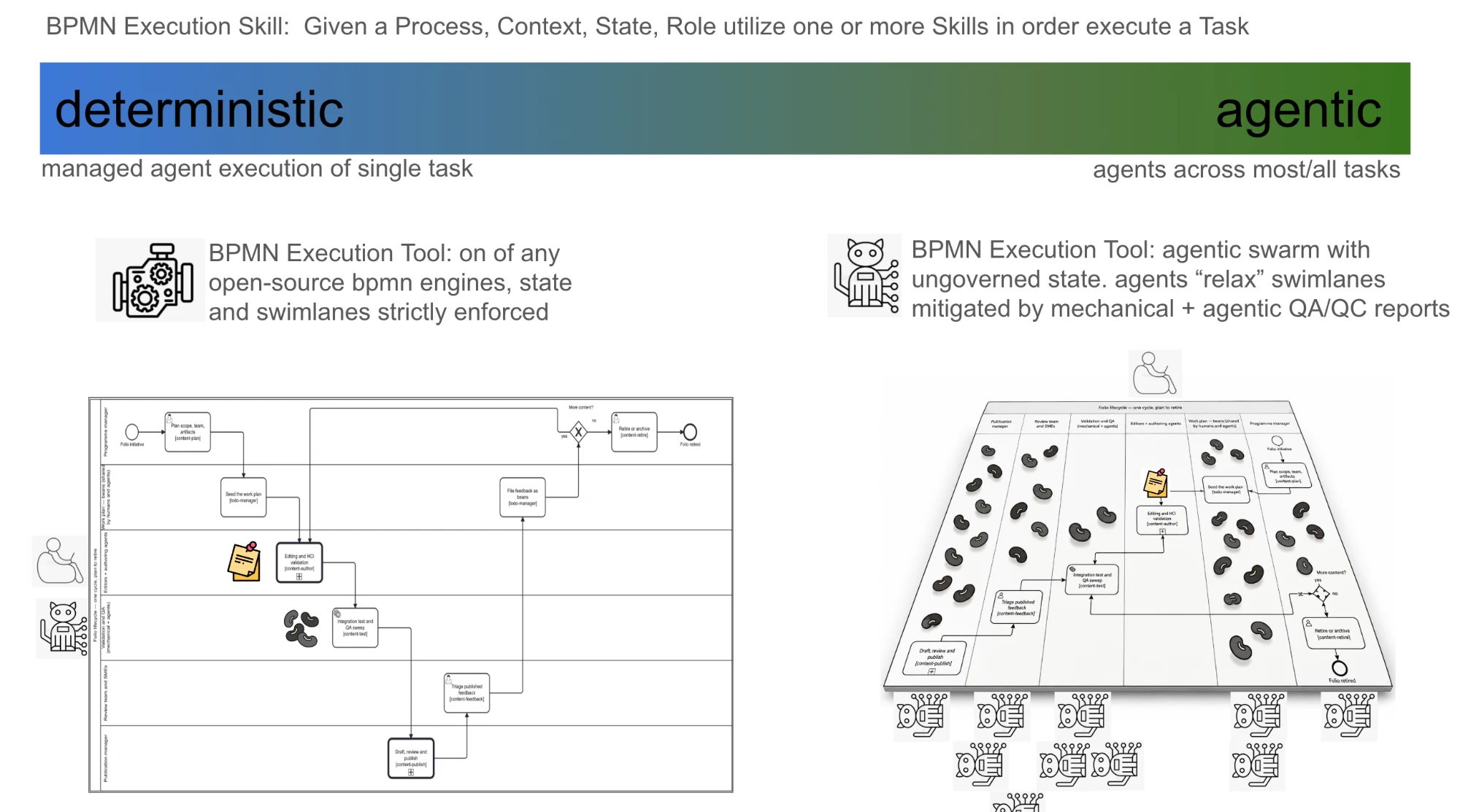
One skill, two kinds of Tool. The skill is the same at both ends: take the process, the context, the current state and the role, pick the skills, and do the task. What changes is the Tool that runs it, and a Tool is swappable behind a skill in the way every other Tool here is.
| deterministic end | agentic end | |
|---|---|---|
| Tool | any open-source BPMN 2.0 engine | an agentic swarm |
| Scope of an agent | one task at a time, handed to it by the engine | most or all tasks |
| State | held by the engine, strictly | ungoverned: the swarm holds it |
| Swimlanes | enforced: only the lane’s role may perform its task | relaxed: an agent may act across lanes |
| What keeps it honest | the engine refuses a step before it happens | mechanical + agentic QA/QC reports find it after it happened |
The two ends differ in when a rule is checked, not in which rule. The same process, the same roles and the same permissions govern both. The engine checks them before a task starts and refuses; the swarm acts and a QA/QC report checks them after, from the record of what was done. That only works if the rules and the record are data a report can read, which is the case for W3C ODRL 2.2 as the permission language and W3C PROV-O as the execution log (owner, 2026-09-23; the schema this implies is the actors, ODRL and PROV-O proposal).
Most real runs sit between the ends, and per task rather than per process: the previous section already counts which gateways are computed and which are judgement calls. A signing step can be engine-enforced inside an otherwise agentic run, and that is a property of the task, not of the whole diagram.
Partly built. No BPMN engine is wired in. The mechanical QA/QC report
now exists: bun run cat prov:qaqc writes each workflow instance’s history as a
PROV-O log and re-checks every step against the ODRL policies, advisory
(issue #1180, step 5; the task-authorization skill). The agentic QA/QC
report does not exist yet. The rest of this section names the target so the
proposal has something to be measured against.
Feature-request workflow (CRDM)
When a request is classified as a feature request, the agent enters the CRDM requirements workflow (full documentation, BPMN).
The feature-request workflow is where this harness document adds the most value, because it describes a behaviour that was previously implicit. The authoring and review workflows have been documented for months; the requirements workflow existed only as ad-hoc conversation.
How the agent enters CRDM
The detection logic is in skills/sdlc/crdm/crdm-detect.md.
Three scenarios:
New session, first request is a feature: → Acknowledge, explain you will help work through requirements first, enter Phase 1.
Existing session, already in CRDM: → Incorporate the new request into the current requirements document, continue.
Existing session, doing content work: → Synthesise the feature need, ask user whether to pause content work and address it now or bean it for later.
What the user sees
The agent does not say “entering CRDM mode” or use methodology jargon. Instead:
“This sounds like a platform change — something we’d need to add to folio-assistant itself. Before I build anything, let me help you work through exactly what’s needed so we get it right. I’ll document the requirements on the issue so others can weigh in.”
How the agent exits CRDM
The CRDM workflow exits when:
- All beans from the signed-off requirements are resolved, OR
- The user explicitly defers the remaining work
On exit, if a content workflow was suspended, the agent resumes it.
User-provided content and sources
Users provide content and source material through multiple channels. The agent should accept all of them and route them into the appropriate pipeline:
| Channel | Example | Routed to |
|---|---|---|
uploads/ directory | User drops a Word doc, PDF, Excel file | Document ingestion pipeline |
library/ references | User references an already-ingested L1 source | Direct citation in content |
content/ edits | User edits a .md block directly | Content authoring workflow |
| GitHub issue attachments | User attaches a file to an issue comment | Agent downloads and processes |
| Chat upload | User uploads a file in the LLM chat interface | Agent saves to uploads/ or processes inline |
| URL reference | User pastes a link to a document | Agent fetches and ingests if appropriate |
For CRDM specifically
During requirements gathering, user-provided content is input to requirements, not content to author. The agent should:
- Read and understand the provided material
- Extract requirements-relevant information
- Synthesise it into the needs statement or requirements document
- Reference the source in the issue comment (with link or attachment)
Example: a user uploads a public consultation feedback Excel spreadsheet. The agent does not try to ingest it as folio content; it reads the feedback items and synthesises them into requirements for the review triage tool.
Issue and bean discipline
Feature work must be linked to a GitHub issue. Content work uses beans. The two are related but not synonymous.
Issues vs beans
| GitHub issue | Bean | |
|---|---|---|
| Scope | A feature, requirement set, or user story | A single PR-sized unit of work |
| Audience | Stakeholders, requestor, BA | Agent, developer |
| Lifecycle | Open → requirements → sign-off → implementation → close | Created → in-progress → resolved |
| Relation | One issue has many beans | Each bean references its parent issue |
Rules for agents
- Feature work → issue first. Before implementing, check:
- Is there an existing open issue? Search by keywords.
- If no open match, check recently closed issues.
- If no match at all, ask the user to create one. Do not create an issue without user permission.
Always feature branch + PR. No exceptions for feature work. The branch name should reference the issue number (e.g.
feat/197-word-import).Always ask before merging to main. The user must explicitly confirm. This is stricter than the general
AGENTS.mdrule for content work, because feature changes affect the platform.- Post round summaries to the issue. After each round of implementation
(one or more beans resolved), post a comment on the linked issue containing:
- What was accomplished in this round
- What remains to be accomplished (open beans)
- Links to updated content for review (staging URLs, docs pages)
- Before/after comparison table for changed pages
Never close an issue without explicit authorization. The BA or stakeholder closes it. The agent closes it only when the BA explicitly says to. An agent must never assume completion.
Requirements may span multiple issues. The agent should link to all relevant issues and note the relationships.
- Beans are not issues.
beans createis for work-plan items. Issues are for stakeholder-facing requirements. Do not conflate them.
Consolidated skill references
The behaviour described on this page draws from skills and guidance documents scattered across the repository. This section maps the consolidated behaviour back to its authoritative sources.
| Behaviour | Source skill / document | Location |
|---|---|---|
| Session start sweep | todo-manager.md § What the session-start sweep emits | skills/sdlc/sdlc-core/todo-manager.md |
| Bean protocol | todo-manager.md, bean-coordination.md | skills/sdlc/sdlc-core/ |
| Commit and PR discipline | continual-progress.md | skills/sdlc/sdlc-core/continual-progress.md |
| Feature-request detection | crdm-detect.md | skills/sdlc/crdm/crdm-detect.md |
| CRDM requirements workflow | crdm-requirements-workflow.md | skills/sdlc/crdm/crdm-requirements-workflow.md |
| Content authoring (paper) | authoring-math skills | shipped by the layer that registers the paper content type, not by this one — ask skill_list |
| Content authoring (document) | folio-document-adapter skills | shipped by the layer that registers the document content type, not by this one — ask skill_list |
| Content lifecycle | content-lifecycle skills | skills/authoring/content-lifecycle/ |
| Document ingestion | docs-generation.md | skills/ui/ui-core/docs-generation.md |
| Dispatch and coordination | dispatch-agent.md, coordinate.md | skills/sdlc/sdlc-core/ |
| Content types and adapters | content-profiles.md | skills/authoring/authoring-core/content-profiles.md |
| BPMN diagram authoring | bpmn-authoring skill | skills/process/workflow/ |
When a skill and this page disagree, the skill wins. This page is a consolidation, not a new authority. If you find a discrepancy, fix this page.
What is not built yet
Workflow state persistence — the harness describes workflow suspension and resumption, but there is no mechanism to persist the agent’s workflow state across sessions. Today this relies on beans and issue comments as proxies.
Automated request classification — the classification table is a reference for agents to read; there is no classifier tool that routes automatically.
BPMN for beans lifecycle — the beans work-plan has a lifecycle (create → claim → in-progress → resolve) that is discussed in
AGENTS.mdand the todo-manager skill but has no BPMN diagram.BPMN for the agentic harness itself — a top-level BPMN diagram showing the idle/workflow state machine and the classification routing is not yet authored.
Session handoff protocol — the rules for what to commit before a session ends are in
AGENTS.md, but there is no structured handoff artefact that a new session can read to resume exactly where the previous one left off.
Tracked in: #203