Harnessed Knowledge Graph Overview
On this page
- 1 — Human and agentic actors and the SMART Guidelines content levels
- 2 — Accessing the WHO L1 corpus
- 3 — The ten components of an L2 DAK
- 4 — Existing L1/L2/L3 schemas
- 5 — Tie the L1/L2/L3 models into the larger KG
- 6 — Roles, tasks, skills and tests in the publication lifecycle
- 7 — BPMN execution, from deterministic to agentic
- 8 — Core data models
- 9 — Knowledge graphs in git, and the questions each repository kind answers
- 10 — What each repository kind may do
- 11 — C@T: the computable asset acquisition, adjudication and agentic test tool harness
- 12 — folio-assistant
- 13 — Operating model: how the layers meet
- Misalignments at a glance
This page is generated from docs/source/concepts-harnessed-kg-overview/ — each section below links to its own source.
The owner’s deck KG / folio-asst (2026-09-30), rebuilt as a page. The page
is generated from the content and assets it describes, so it moves when they
move. The original is kept, frozen and dated, as the L1 source
cat-harness/library/kg-folio-asst-2026-09-30: thirteen slides, their speaker notes and all 33 images with
descriptions.
Two differences from the original, both deliberate:
- The words are text. Most of the original’s content was baked into pictures, which search, translation and screen readers cannot reach. Every word below was read off those images and written out. The deck’s own pictures are kept beside that text. Where the repository generates a picture (the BPMN process, the UML model), today’s version is shown and the slide’s version sits collapsed beneath it, so the current one is never the one you have to open.
- Each slide is checked against the knowledge graph. Under every slide, Sources names the KG nodes it depends on. A Misaligned note says where the snapshot and today’s KG disagree, and which one is right. The last section lists them all.
Format. One slide is one ## section of plain Markdown. That is Pandoc’s
slide-level convention, so this same page can be converted to reveal.js,
Beamer or PPTX by Pandoc if a file is ever needed. No second source is kept.
Metadata follows schema.org PresentationDigitalDocument.
1 — Human and agentic actors and the SMART Guidelines content levels
WHO envisions a future where everyone in the world benefits fully and immediately from clinical, public health and data-use recommendations. SMART Guidelines systematize and accelerate the consistent application of recommended, life-saving interventions in the digital age.

| level | what it produces | on the slide | |
|---|---|---|---|
| L1 Narrative | WHO guideline publications | a knowledge graph of literature and data sources | 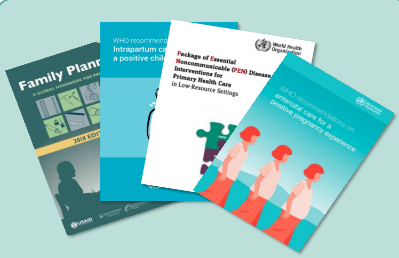 |
| L2 Operational | the Digital Adaptation Kit | structured requirements |    |
| L3 Machine readable | FHIR implementation guides | fully computable assets |   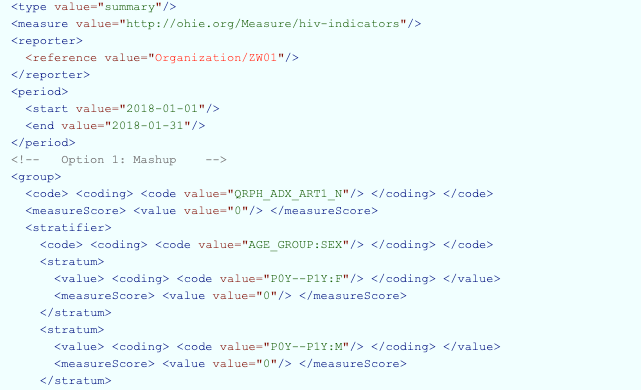 |
| L4 Executable | reference software | customizable software |    |
| L5 Dynamic | trained, optimised algorithms | advanced analytics for precision health |  |
What spans which levels. Under the five levels the slide draws four bars, and each bar’s reach is part of what the slide says. Read from the slide’s geometry, not its text:
| bar | L1 | L2 | L3 | L4 | L5 |
|---|---|---|---|---|---|
| content | content: L1 to L3 | ||||
| test data | test data: L2 to L4 | ||||
| tooling | tooling: L3 and L4 | ||||
| apps | apps: L4 | ||||
So content is authored across L1 to L3, and L3 is where content and tooling meet. Test data starts at the DAK and runs through executable software, and apps are L4 alone. No bar reaches L5.
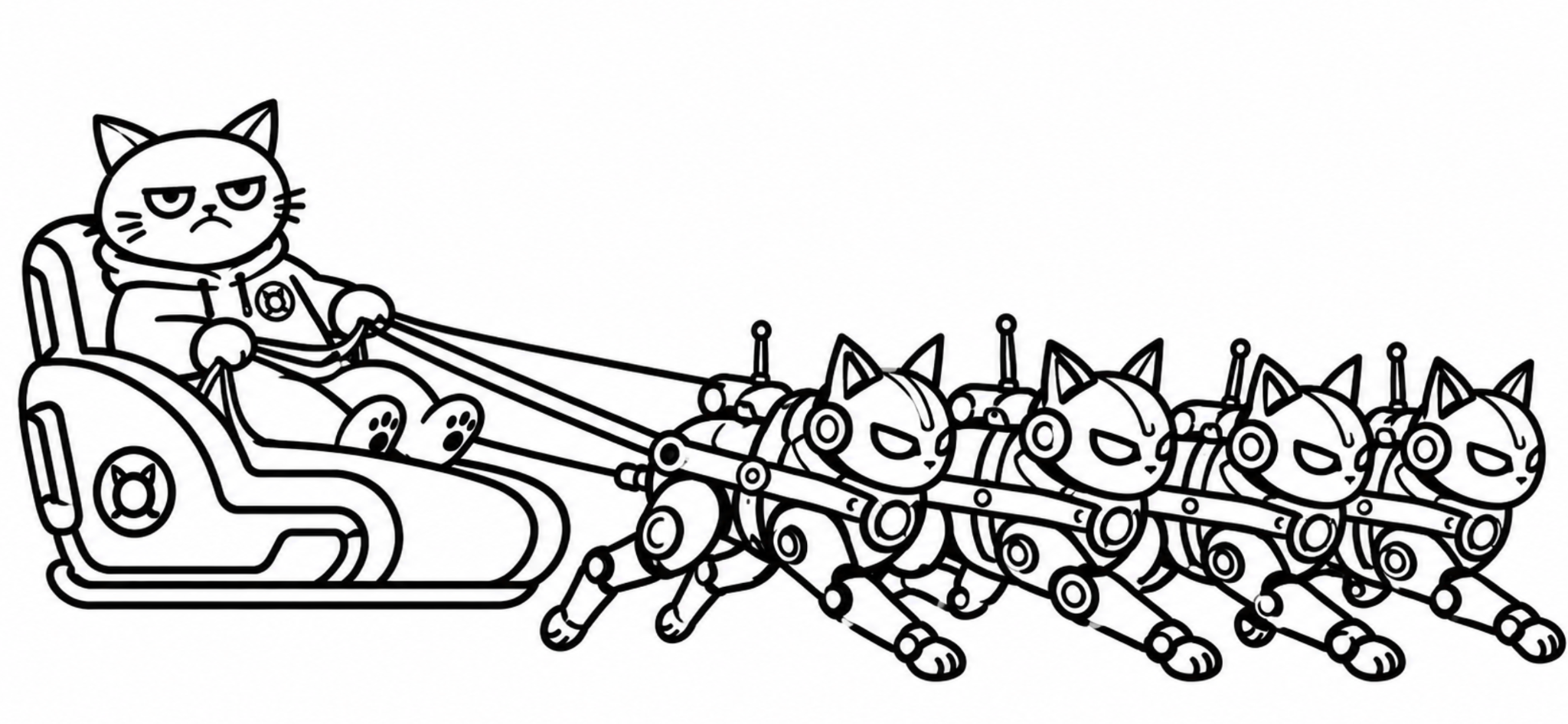
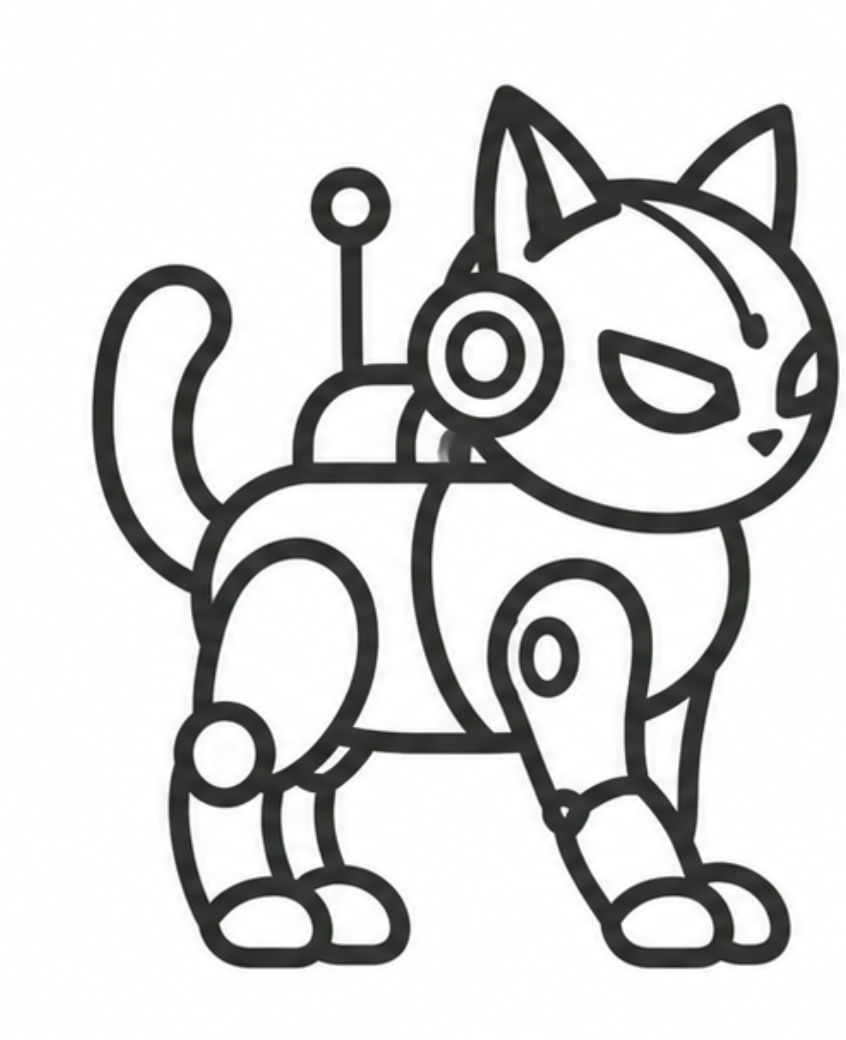
Two questions sit at the two ends of the band. How can I reliably author, review and adjudicate faster? is drawn on the left, over L1, beside the human actor (the cat at the laptop). How am I verifiable? is drawn on the right, over L5, beside the agentic actor (the robot cat). The slide pairs each question with an actor by position only; it states no pairing in words.
Sources: FHIR content — the five layers;
the DAK layer’s library/mehl-2021-who-smart-guidelines (the primary source, Lancet
Digital Health 2021); the DAK layer’s library/9789240093362-eng §1.2 (WHO’s handbook
restating them).
Misaligned (fixed on this branch): the docs said SMART Guidelines “names three layers”. It names five. The page now lists all five and says why FHIR content stops at L3.
Misread, and corrected here: an earlier version of this page flattened the bars into one “who asks” label per level (content for L1 and L2, tooling for L3, apps for L4 and L5) and said test data “sits beside every level”. The slide’s geometry says otherwise: the table above is measured from the deck’s shape positions.
2 — Accessing the WHO L1 corpus
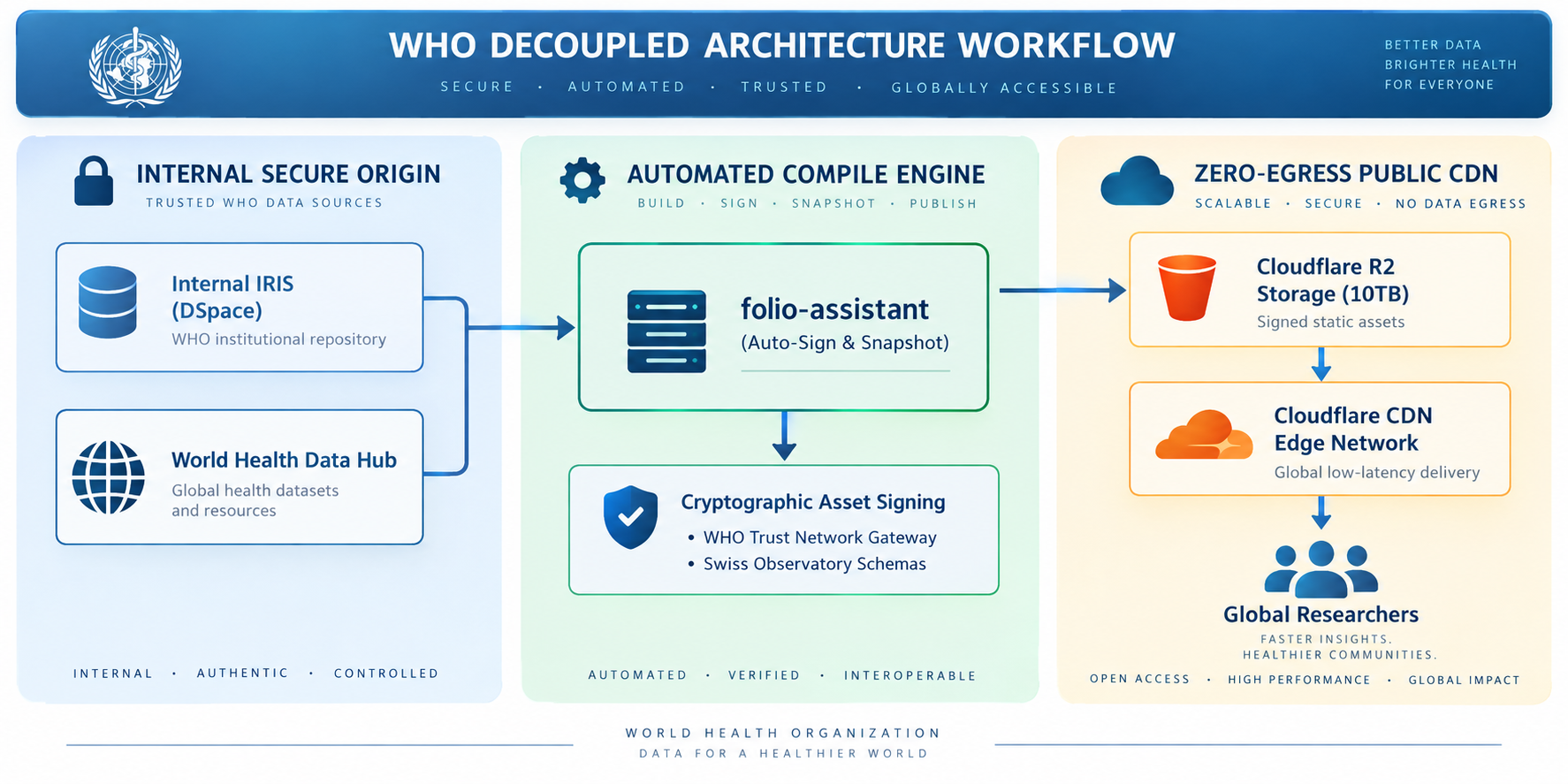
WHO’s public-health information is split between literature repositories, IRIS (DSpace), and structured indicators in the World Health Data Hub. Unifying them into one knowledge graph needs a platform with room to grow to about 10 TB, with high throughput and without high network costs.
| problem | proposed answer |
|---|---|
| Egress fees make serving 10 TB globally unpredictable | a zero-egress public CDN holding signed static assets |
| Automated traffic, above all in emergencies, can overload internal systems | decouple: an internal secure origin, published snapshots outside it |
| Authenticity and chain of custody in an era of AI-generated content | sign every published asset (WHO Trust Network gateway) |
The architecture drawn on the slide runs in three stages. An internal secure origin (IRIS and the Data Hub) feeds an automated compile engine: folio-assistant builds, signs, snapshots and publishes. That engine feeds a public CDN, named on the slide as Cloudflare R2 storage and the Cloudflare edge network.
Sources: kg-to-portal
(package and per-asset signatures; “a CDN is a LAYER”);
large-datasets (the WHO IRIS source descriptor); the IRIS replica (the DSpace skill).
Misaligned — proposal, not decision: the repository treats the CDN as a swappable layer.
kg-to-portalandlarge-datasets’ artifact store name Cloudflare and R2 only as examples beside GitHub Pages, jsDelivr and S3. The slide names Cloudflare as the choice. Before this deck, the 10 TB figure, the World Health Data Hub and “Swiss Observatory schemas” appeared nowhere in the repository. The decision is now recorded, as proposed, with no outcome yet, in beanl9v6(MADR form). It holds the drivers, three real options (Cloudflare R2 + CDN, GitHub Pages alone, another object store + CDN) and what has to be measured before one is chosen. Read this slide as that proposal.
3 — The ten components of an L2 DAK
| # | component | what it holds |
|---|---|---|
| 1 | Health interventions and recommendations | the WHO guideline’s recommendations; informs DAK scope |
| 2 | Generic personas | roles, responsibilities and interventions of the targeted personas |
| 3 | User scenarios | brief narratives of how the personas engage with the system |
| 4 | Business processes and workflows | generic clinical and non-clinical workflows; when data is collected and used |
| 5 | Core data elements | data for decisions and indicators; informs forms and L3 interoperability |
| 6 | Decision-support logic | decision tables for counselling and treatment algorithms |
| 7 | Scheduling logic | decision tables for scheduling by care plan (formerly part of 6) |
| 8 | Indicators and monitoring | numerators and denominators; person-centred data linked to aggregate |
| 9 | Functional and non-functional requirements | key functions and requirements of a digital tracking and decision-support system |
| 10 | Test scenarios | test data and scenarios to check a system against the other nine |
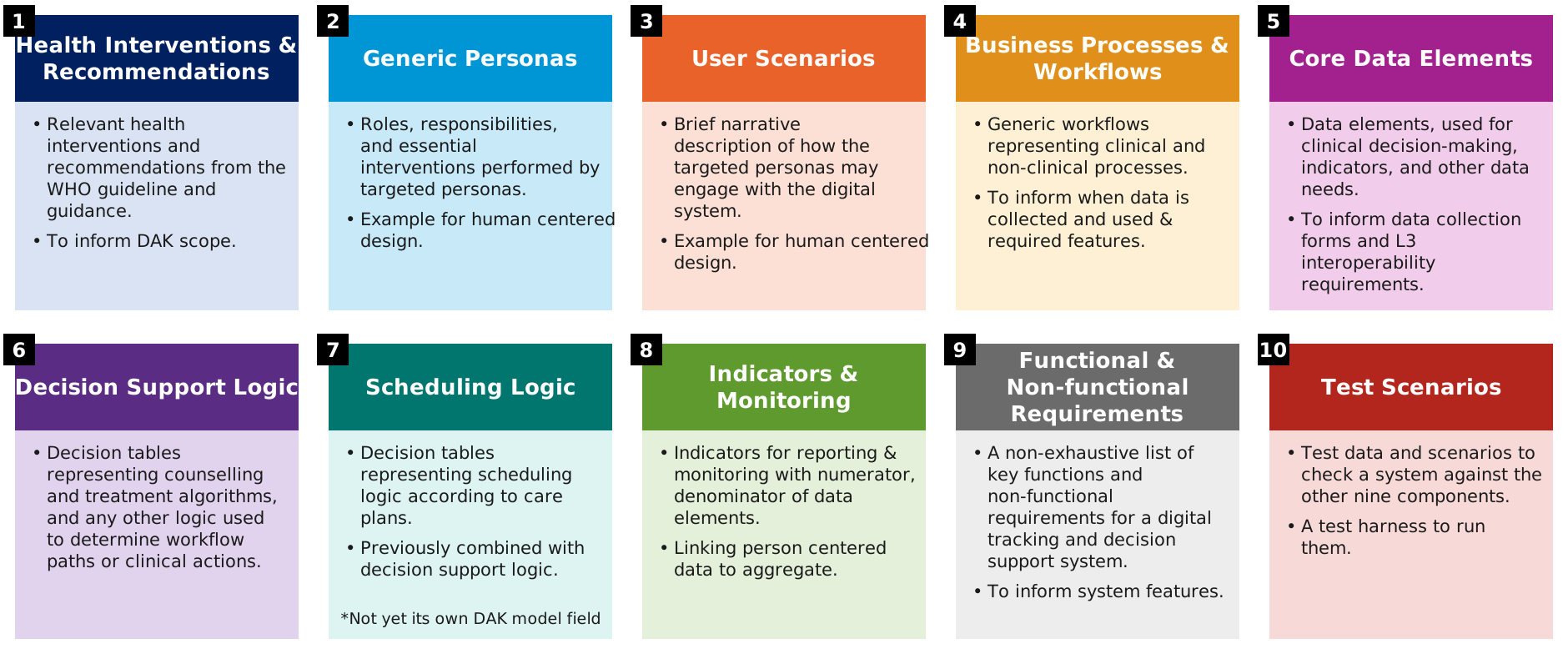
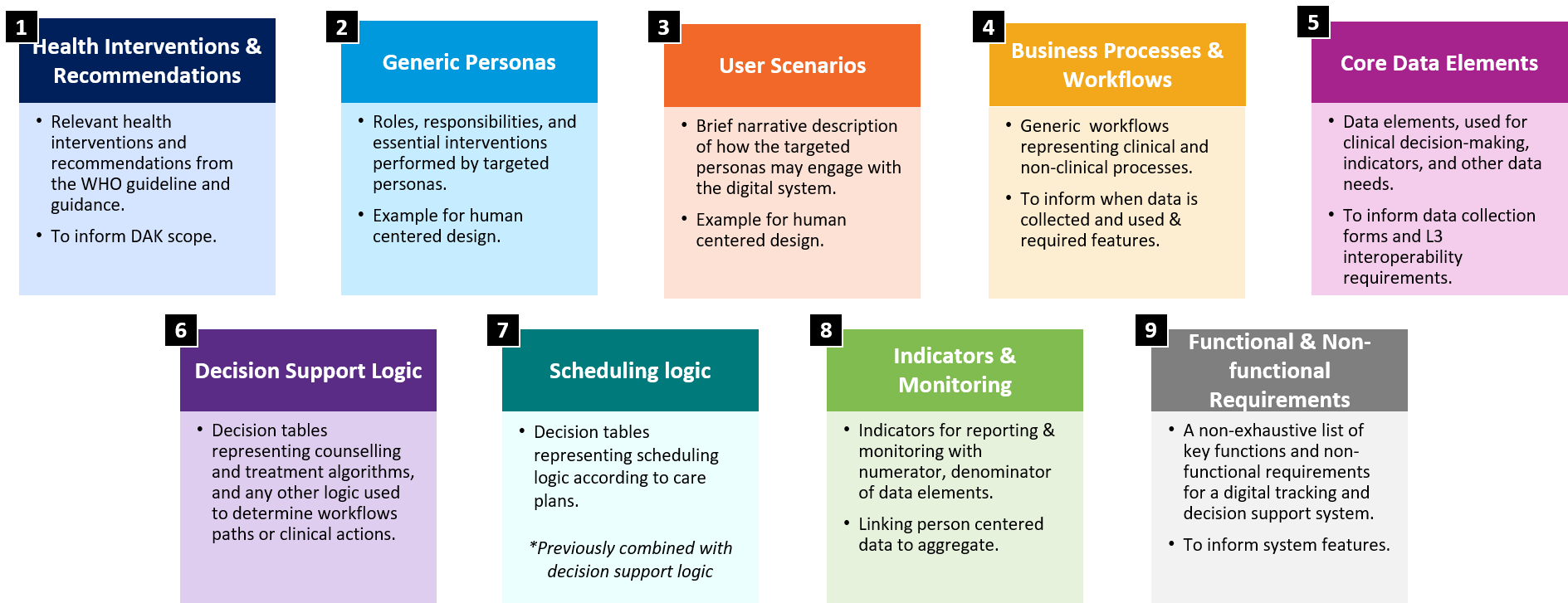
The slide drew nine cards and put the tenth, testing: test data and test harness, beside them. The squares below give all ten a card, and are generated from DAK_COMPONENTS (the DAK layer’s scripts/gen-dak-components-figure.ts), so a component added there cannot go without one.
The figure as it appeared on the slide (2026-09-30): nine cards
Sources: the owner, 2026-09-30 (ten: the original eight plus scheduling
logic and test scenarios); the SMART Base 1.0.0 DAK logical model;
the L2 artefacts and their skills.
Misaligned, in three directions: the speaker notes said 8. The figure shows 9 cards, with testing beside them. The SMART Base
DAKlogical model (DAK.fsh) declares 9 fields: test scenarios in, scheduling logic carried inside decision-support logic. The owner’s count is 10. WHO’s IG starter kit disagrees with itself the same way: its introduction counts 9 with scheduling and no testing, and its table counts 9 with test scenarios and scheduling inside decision support. Scheduling logic is authored as DMN decision tables but may not yet be formalized as its own L2 component or L3 artefact, and that is the gap the logical model shows. This repository’sDAK_COMPONENTSlists all ten and marks scheduling logic as not yet formalized. The notes are corrected in the owner’s copy.
4 — Existing L1/L2/L3 schemas
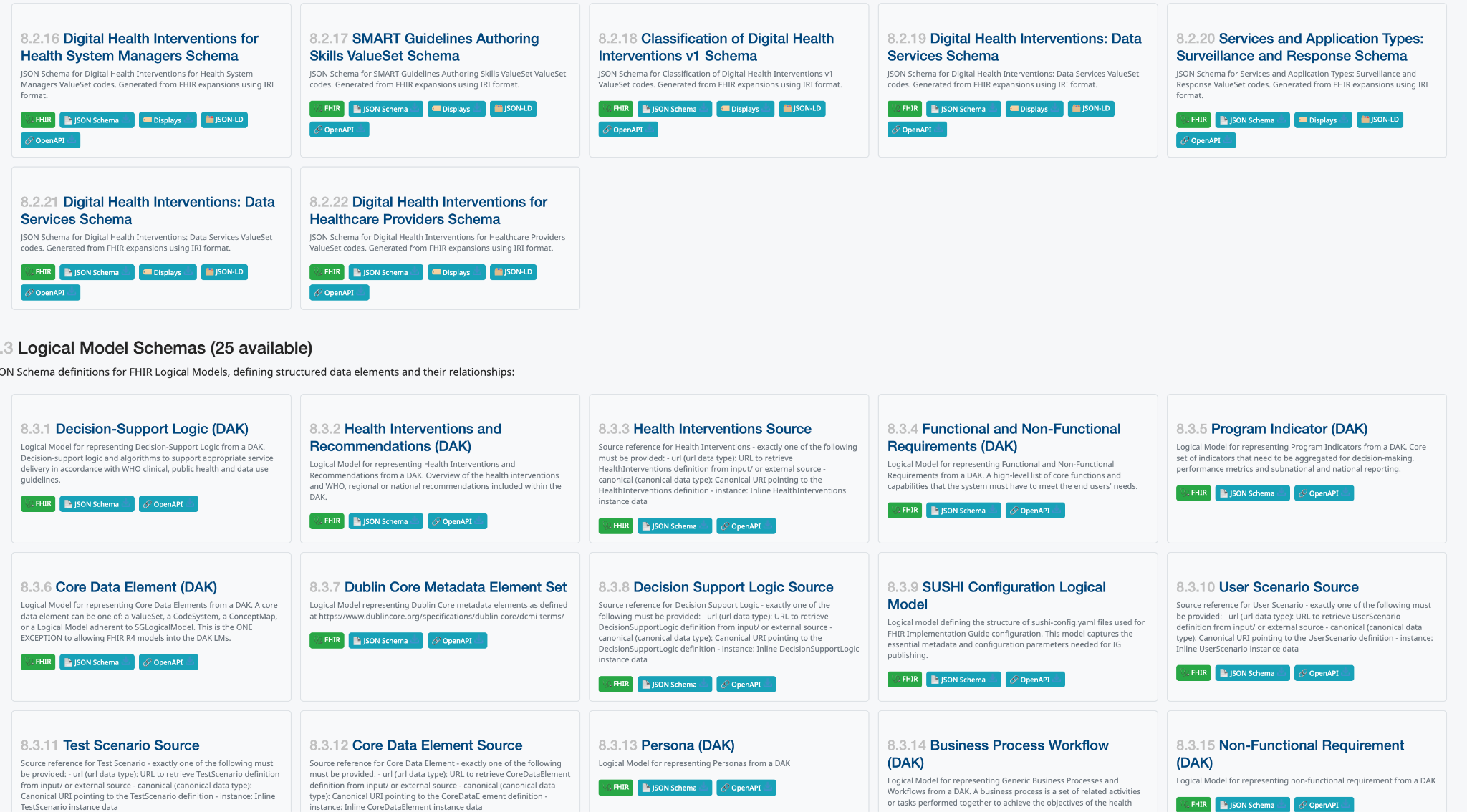
SMART Base publishes a JSON Schema, and an OpenAPI description, for every DAK
logical model and value set. Examples are the decision-support logic, health
interventions, functional and non-functional requirements, program indicator,
core data element, persona and business-process workflow models, the Dublin
Core metadata set, and value sets such as the classification of digital health
interventions. A source reference such as DecisionSupportLogicSource must give
exactly one of url, canonical or an inline instance.
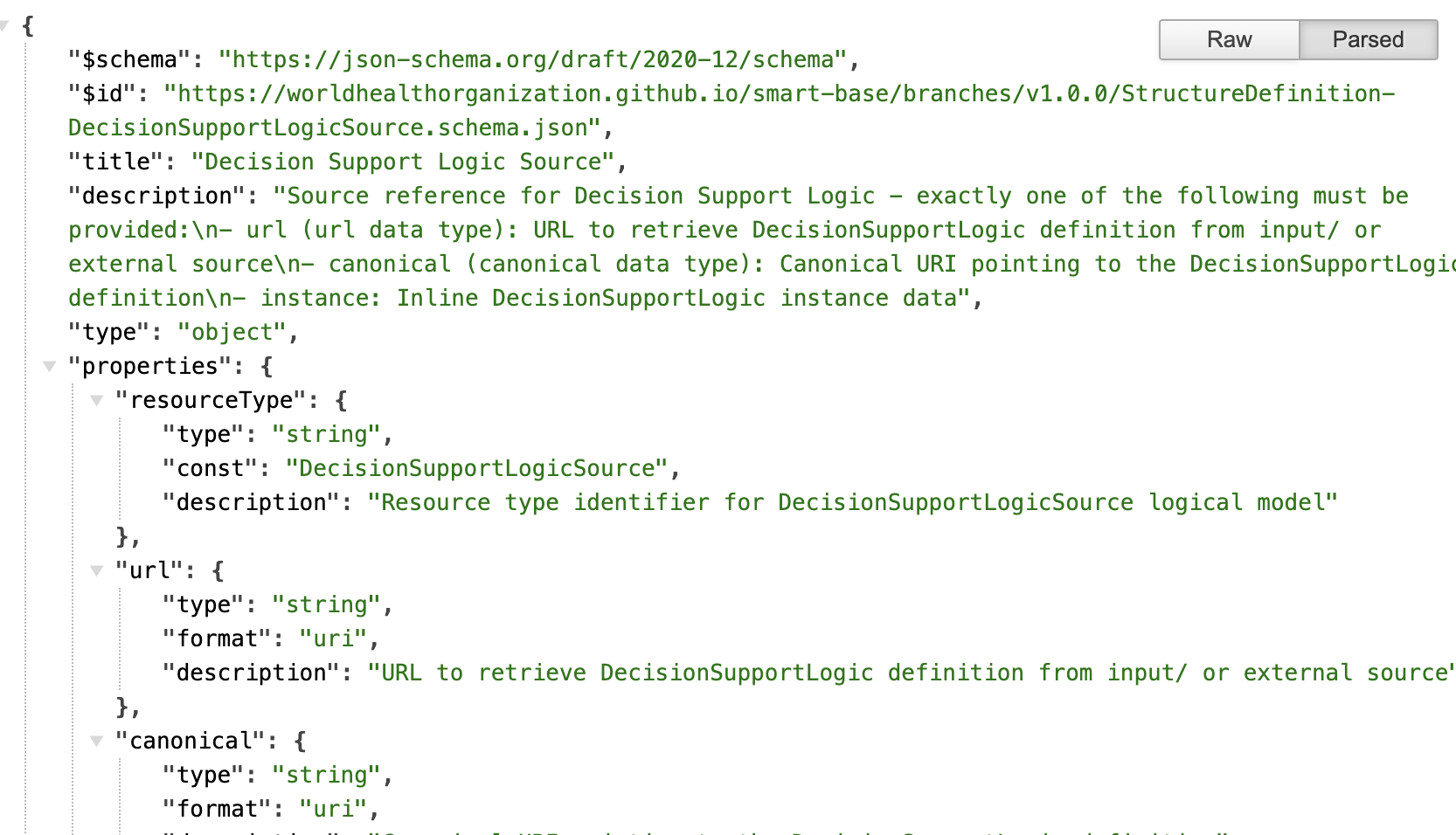
On the slide the JSON Schema is drawn over the list as a callout of one entry,
DecisionSupportLogicSource, so it reads as “this is what one of these
entries holds”. The QR code beside it points at the API page.
Source: https://smart.who.int/base/dak-api.html; the ingested index
the DAK layer’s fhir-artifact-index.
Aligned in count, not checked item by item: the slide shows “Logical Model Schemas (25 available)”, and the ingested index holds 25 StructureDefinition pages.
5 — Tie the L1/L2/L3 models into the larger KG
The DAK logical model (SMART Base 1.0.0) is a complete kit with its metadata (id, name, title, description, version, status, publication, preview and canonical URLs, licence, copyright year, publisher) and its components: nine in this model, ten by the owner’s count (see slide 3). Each component is held as a source reference, not inline: by URL, by canonical or as an instance. That indirection is what lets the kit’s parts be nodes of a larger graph.
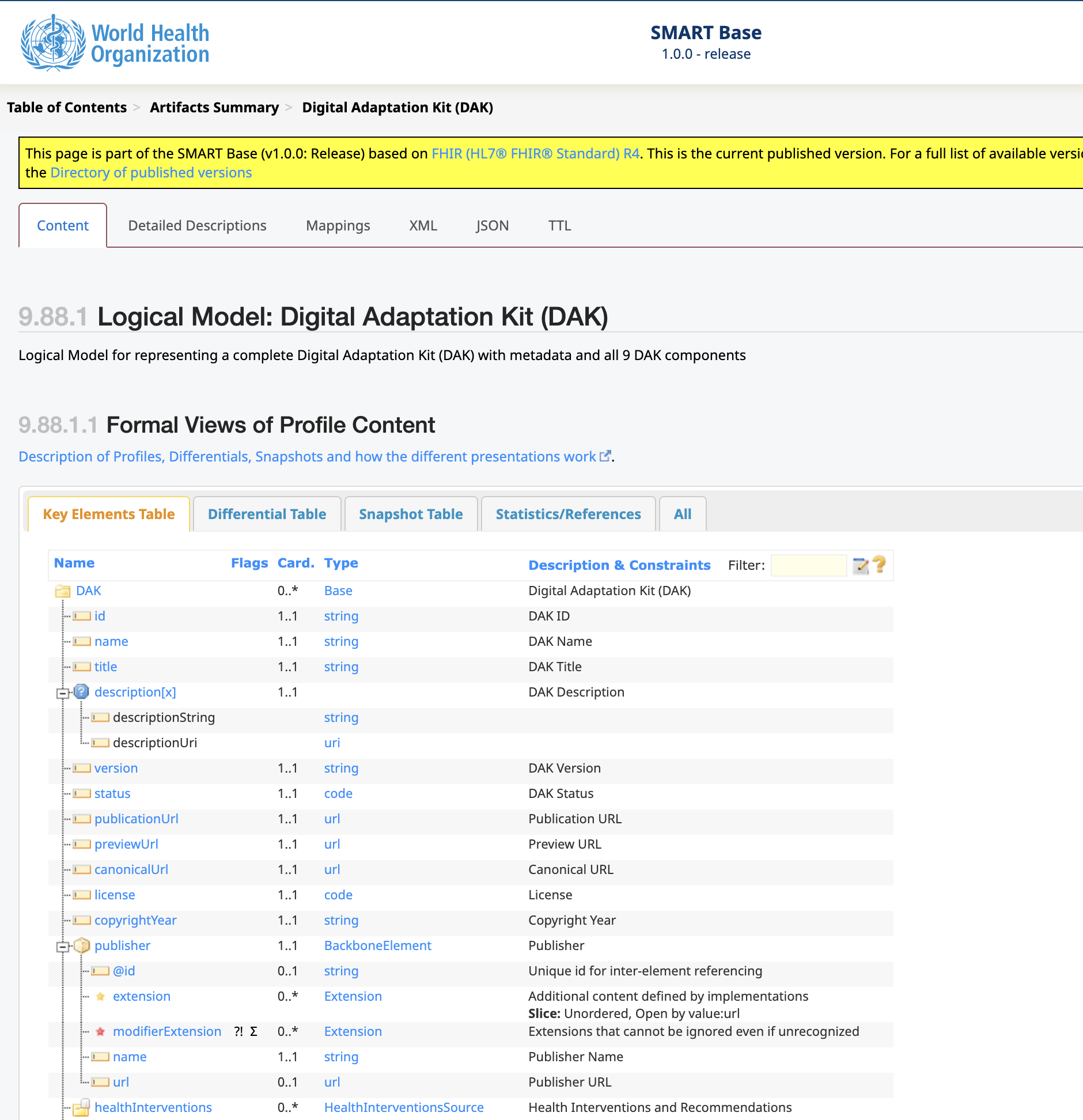
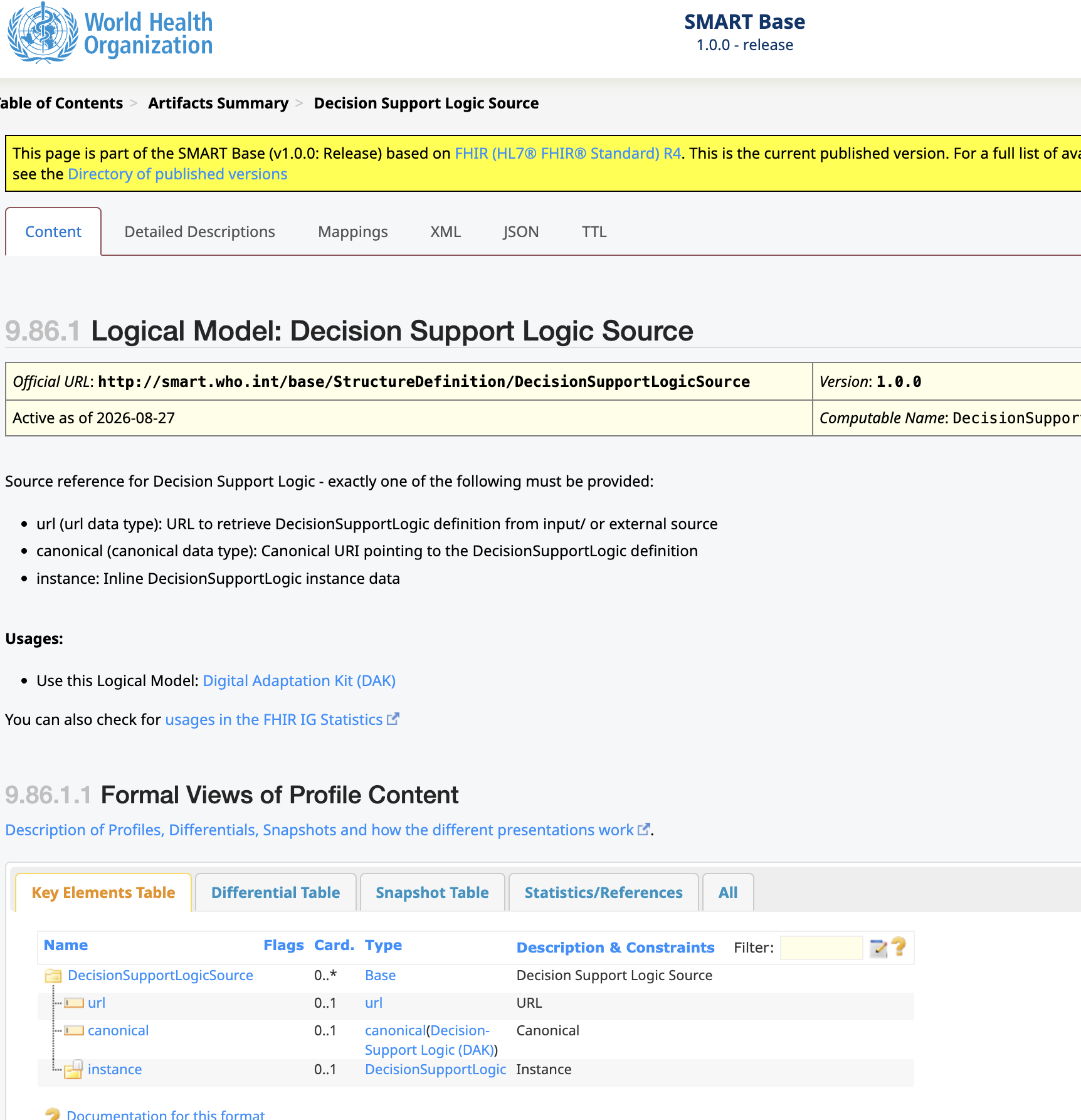
Sources: https://smart.who.int/base/StructureDefinition-DAK.html; FHIR content — the DAK API surface.
6 — Roles, tasks, skills and tests in the publication lifecycle
An agent uses skills to execute one or more tasks in a process. It works with a knowledge graph of static context (skills, user stories) and dynamic context. A skill may have zero or more tools, used for test execution anywhere on the deterministic-to-agentic spectrum.
- Role: played by a human, agentic or mechanical actor; a swimlane in BPMN.
- Task: a step in a process; a node in BPMN.
 Skill: a gated capability with schema-defined inputs and outputs.
- Test: used to compare models, or for author review.
 Agentic state: beans, which agents use to coordinate and track their
state within a process (“changes to the vaccination schedule ready for review in
staging”).
Agentic state: beans, which agents use to coordinate and track their
state within a process (“changes to the vaccination schedule ready for review in
staging”). Human state: todos, attached to process steps or knowledge assets
(“please review this change in medication”).
Human state: todos, attached to process steps or knowledge assets
(“please review this change in medication”).

The diagram as it appeared on the slide (2026-09-30)
![BPMN diagram "Folio lifecycle — one cycle, plan to retire", in six horizontal lanes. Programme manager: Folio initiative (start), Plan scope, team, artifacts [content-plan]. Work plan — beans (shared by humans and agents): Seed the work plan [todo-manager]. Editors + authoring agents: Editing and HCI validation [content-author], a subprocess. Validation and QA (mechanical + agents): Integration test and QA sweep [content-test], a service task. Publication manager: Draft, review and publish [content-publish], a subprocess. Review team and SMEs: Triage published feedback [content-feedback]. Work plan again: File feedback as beans [todo-manager]. Programme manager: gateway "More content?" — yes loops back to editing; no leads to Retire or archive [content-retire] and the end event Folio retired. Each bracketed name is the skill the task runs.](/folio-assistant/assets/img/kg-deck/img-p006-1.webp)
How the slide labels the diagram. On the slide the terms sit around the BPMN picture and lines tie each one to a part of it:
- Process points at the whole diagram, captioned (publication lifecycle), with (Context) beside it.
- User Story is tied to Role, and Role to one lane, the one labelled Editor (editors and authoring agents).
- Task points at one node in that lane, Edit Doc (today: editing and HCI validation).
- Skill hangs off that task, and Test hangs off the skill.
- The beans icon sits by agentic state and the sticky note by human state.
So the slide says a user story names a role, a role is a lane, a task is a node in it, a skill belongs to a task, and a test belongs to a skill.
Sources: the content core’s processes/content/content-lifecycle.bpmn (the picture above is generated
from it); beans and todos.
Aligned: the snapshot’s diagram and today’s process have the same six lanes and the same eight tasks.
7 — BPMN execution, from deterministic to agentic
BPMN execution skill: given a process, context, state and role, use one or more skills to execute a task.
- Deterministic end: managed agent execution of a single task. The tool is any open-source BPMN engine, and state and swimlanes are strictly enforced.
- Agentic end: agents work across most or all tasks. The tool is an agentic swarm with ungoverned state. Agents “relax” swimlanes, and mechanical plus agentic QA/QC reports mitigate it.
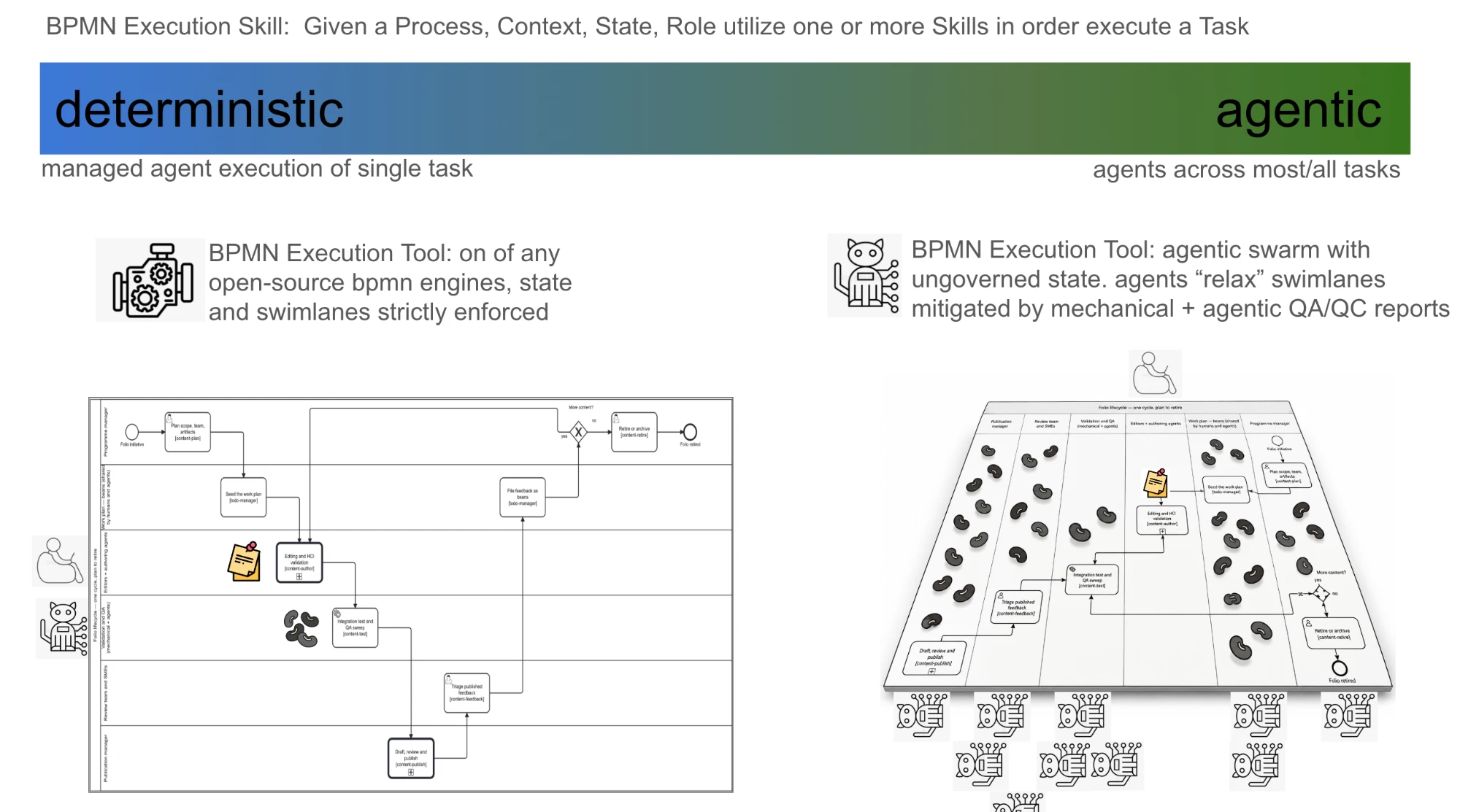
What the two halves place where. On the deterministic side the human and the agentic actor stand beside the flat diagram’s lanes, with one sticky note on the authoring task and one bean on the test task: one task at a time, each state marker where its task is. On the agentic side the human rides above the board, a row of agents hangs beneath it, and beans lie in every lane.
Sources: BPMN execution;
specification-compiled-agents (which now cites this deck).
Partly built: no BPMN engine is wired in, and the agentic QA/QC report does not exist yet. The mechanical one does:
bun run cat prov:qaqc.
8 — Core data models
The harness’s own schemas, drawn from the JSON Schemas they are generated from, in four packages. test holds the KG QA report and the test run. process holds the task and the OMG BPMN 2.0 process. scenario holds actor, role, user story, voice and skill. schema holds JSON Schema and external schema. An actor takes on roles, a role carries skills, a task sits in a lane of a role and uses a skill, a test run tests a skill, and a QA report audits any kind of subject.
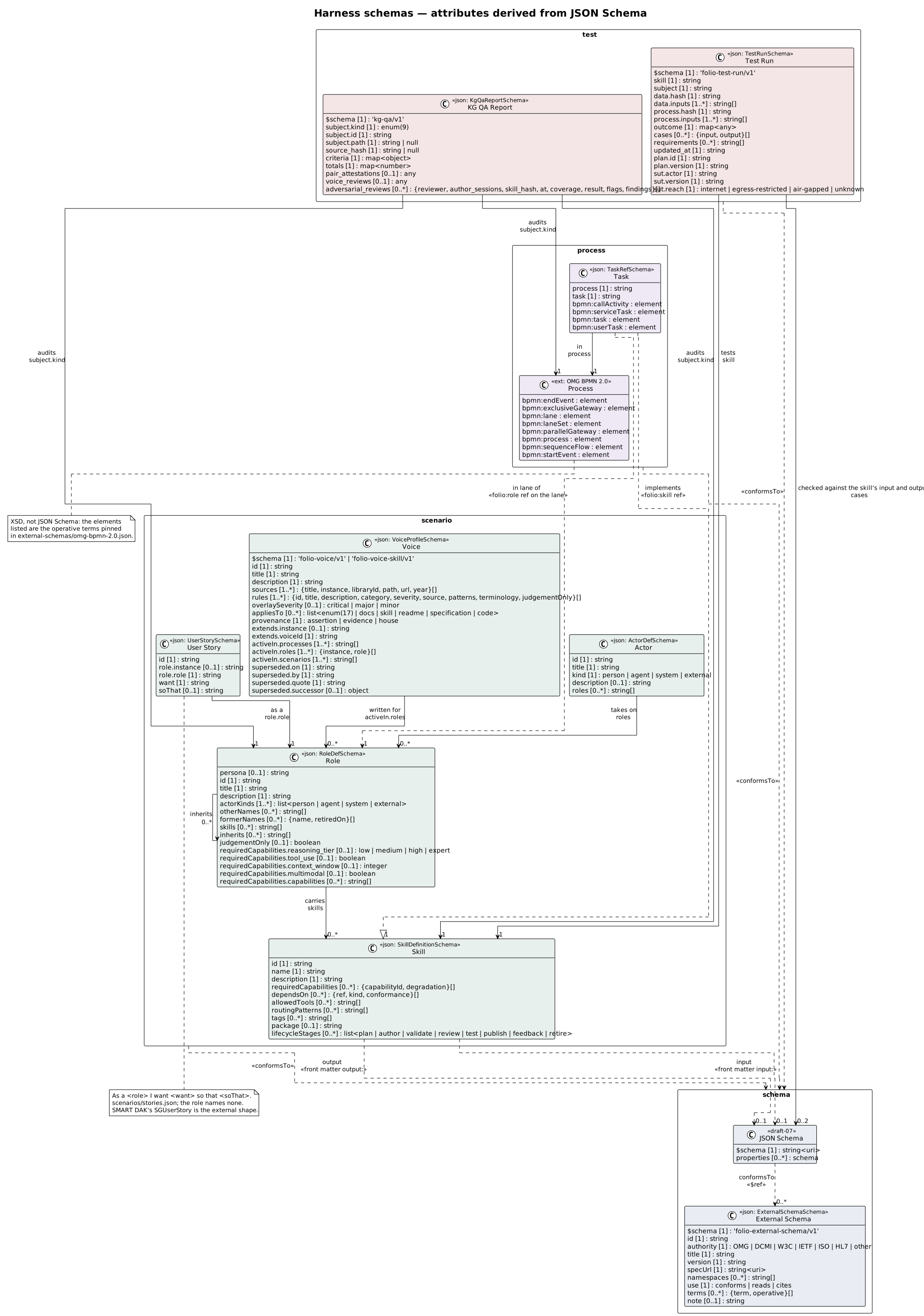
The diagram as it appeared on the slide (2026-09-30), without Voice Profile
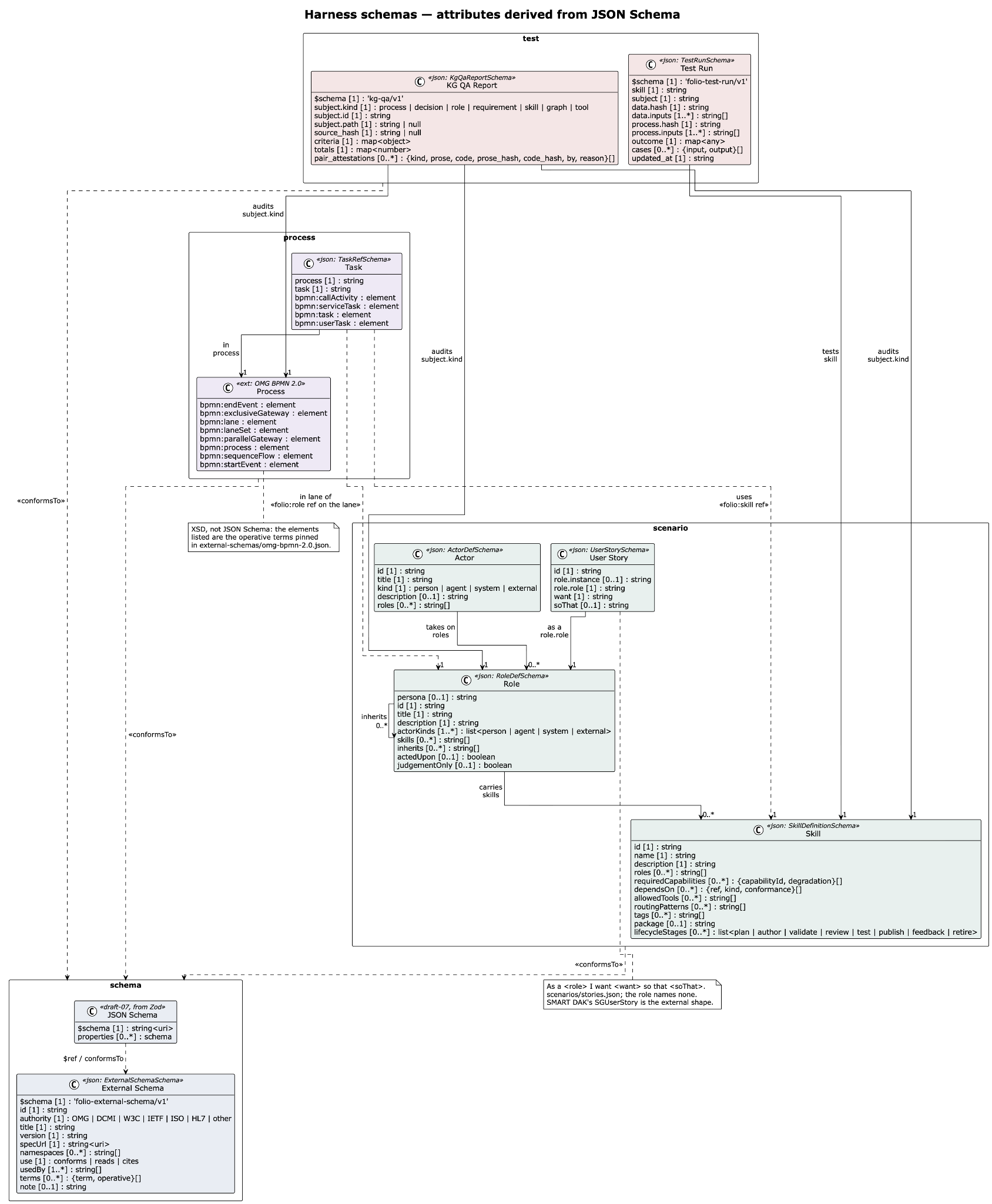
Source: bun run cat uml:overview regenerates the picture above from the schemas.
Misaligned — the snapshot is older: today’s diagram has a Voice Profile class that slide 8 does not. The picture above is the current one. The owner’s copy now shows it too: slide 8 carries a fresh render, cropped to the same four packages.
9 — Knowledge graphs in git, and the questions each repository kind answers
Knowledge graphs are managed in git repositories, made of self-documenting JSON and JSON-LD. Content is rendered in several formats for downstream knowledge products and for public, clinical and personal health applications.
| kind | the question it answers | examples on the slide |
|---|---|---|
| Tool repos | how can we compare deterministic and agentic workflows in well-defined processes? | who/smart-kg-tools, ohs/folio-asst-tools |
| Content repos | how can agentic workflows support quality-assured, evidence-based authoring and publication, and how can agentic access to knowledge assets keep trusted provenance without overloading existing systems? | ohs/harness, ohs/folio-asst, who/ref-arch, who/iris, who/smart-hiv, kenya/smart-hiv, who/data-hub |
| Test repos | how can we adjudicate, quality-control and compliance-test model performance in several modalities? | who/smart-imz-test, kenya/smart-hiv-test |
| Consumer apps | how can they be assured in agentic public-health and clinical workflows? | app:ohs-*, app:anthropic-mcp, app:turn.io |
The colours are slide 1’s. Each repository kind is filled in the colour of a bar under the SMART levels on slide 1: tool repos in tooling’s colour, test repos in test data’s, consumer apps in apps’, and content repos unfilled like content. So the slide ties each kind to a span of levels: content to L1 to L3, tools to L3 and L4, tests to L2 to L4, apps to L4.
Source: Repo taxonomy.
Misaligned — target, not current: none of these repositories exists under these names. Today it is one monorepo,
litlfred/folio-assistant, with instance directories (cat-harness, the content core, the DAK layer, the IG instances, the IRIS replica, …). Current state is the measured picture, and the slide is the future state.
10 — What each repository kind may do
- Tool repos may implement a skill through coordinated tools (scripts, retrieved software, local or remote services, containers). They may make tools available to agents over MCP or for local execution, configure tools for the test harness (the ITB), and define more than one tool for a skill.
- Content repos may define schemas for the content types of KG nodes and
instantiate them. They may define the skills needed to publish and consume
that content, and designate each skill agentic, mechanical or human. They
must constrain skill inputs and outputs with schemas (JSON,
.ts). - Test repos may hold test data, test-data generation templates and configuration, FHIR test plans and test-language dialects (Gherkin), and may make test data available to the ITB and to SME review.
- Consumer apps may use KG schemas and instance data from content repos, execute their decision logic or indicator calculations, and use test and tool repos to develop, prepare for a connectathon or test compliance.
How the slide relates them. Slide 10 draws named repositories joined by labelled lines. The lines carry no arrowheads, so the direction below is read from each label, not from the drawing:
| from | relation | to |
|---|---|---|
who/smart-kg | depends on | who/<dak-layer> |
who/smart-immz | depends on | who/<dak-layer> |
who/smart-kg | references | who/smart-kg-tools |
who/<dak-layer> | references | who/smart-base-tools |
who/smart-immz | references | who/smart-imz-test |
who/smart-kg-tools | utilizes | who/smart-base-tools |
who/smart-imz-test | utilizes | who/smart-base-tools |
| consumer apps | utilize | who/smart-immz, who/smart-imz-test |
Read as a rule: depends on runs content to content, references runs from content to its own tools and tests, and utilizes runs from a tool, a test or an app to what it uses.
Sources: Repo taxonomy; KGraph repositories.
Aligned: slide 10’s
who/smart-kgis a real, separate repository, which is the repo taxonomy’s worked example of splitting content from tools. Its stub directory in this checkout was removed because the repository already exists elsewhere (beanwg7r), and the taxonomy now says so. An earlier version of this note read that removal as the example going stale.
11 — C@T: the computable asset acquisition, adjudication and agentic test tool harness
caaaaatt → caa∞aat → ca&at → c@t → cat-harness. The name compresses one letter at a time. The harness is the platform layer every folio builds on.
Sources: the harness; cat-harness/cat-harness.json.
Misaligned — “not yet live”: the slide gives http://litlfred.github.io/ and http://github.com/litlfred/ with no path. The harness is published today as part of https://litlfred.github.io/folio-assistant/.
12 — folio-assistant
Site: https://litlfred.github.io/folio-assistant/ · repository: https://github.com/litlfred/folio-assistant
Misaligned — broken link: the slide spells the repository
github.com/litlfred/folio-assitant(missing an s). That link resolves to nothing. It is corrected in the owner’s copy.
13 — Operating model: how the layers meet
An actor performs a task in a process as a role, using that role’s skills.
| Actor | who | a concrete participant, human, agentic or mechanical; carries permissions across all lanes |
| Task | does what | an activity in a diagram; names the skill to run and the bean operation to perform |
| Process | where | an executable BPMN diagram with DMN gateways; its state is committed so sibling sessions agree |
| Role | as whom | a swimlane; an actor acts as a reviewer only for the length of a lane |
| Skill | knowing how | the instruction body for the task; lives in the knowledge graph and is inherited across instances |
Sources: platform; the role-model skill.
Aligned: the Actor schema spells the three kinds
person,agentandsystem(human, agentic and mechanical), and adds a fourth,external: a participant outside this instance, which is never given a task. Therole-modelskill and the schema’s own documentation state the same mapping. An earlier version of this note called the four values a contradiction. That read the enum without its documentation.
Misalignments at a glance
| slide | what disagrees | which is right | state |
|---|---|---|---|
| 1 | docs said SMART has three layers | five (Mehl et al. 2021, the primary source) | fixed on this branch |
| 1 | this page flattened the bars under the levels | the slide’s geometry: content L1–L3, test data L2–L4, tooling L3–L4, apps L4, none at L5 | corrected on this page |
| 2 | Cloudflare named as the CDN; 10 TB, Data Hub, “Swiss Observatory” appear nowhere else | undecided — the repo keeps the CDN swappable | recorded as proposed: bean l9v6 |
| 3 | notes 8; figure 9; logical model 9, scheduling not its own field | 10: the original 8 + scheduling logic + test scenarios (owner) | code lists 10, scheduling marked unformalized; WHO model lags |
| 8 | UML lacks Voice Profile | the generated diagram | page shows current; owner’s copy re-rendered |
| 9 | target repository names | the monorepo today | target vs current |
| 9 | this page listed ohs/harness as a tool repo | the slide places it with the content repos | corrected on this page |
| 10 | this page summarised the relations in one line, wrongly | the eight labelled lines on the slide | corrected on this page |
| 11 | “not yet live” links | published under folio-assistant | snapshot only |
| 12 | folio-assitant link | folio-assistant | corrected in the owner’s copy |
Aligned: slides 4 (count), 5, 6 (same lanes and tasks), 7 (partly built), 10 (smart-kg is its own repository) and 13 (three taskable actor kinds, plus external).